Chinese
  English
  Arabic
  French
  German
  Portuguese
  Russian
  Spanish
  Polish
  Italian

升华打印机配置文件,也称为ICC配置文件,非常重要。它有助于确保每次打印时颜色看起来都一样。此配置文件会根据打印机、墨水、纸张和材料等进行调整。它就像一张引导颜色看起来正确的地图。 致语 提供使颜色管理变得容易的解决方案。它们的轮廓专为工业升华而设计,确保衣服、标志和硬物等物品得到生动、可靠的结果。
| 💡 新手指南: 如果你刚刚开始,请找出 如果升华打印机是初学者的明智选择 在你第一次投资之前。
什么是升华打印机配置文件,你为什么要关心?
在升华打印中正确地使用颜色是一件大事。升华打印机配置文件,或ICC配置文件,是一个文件,告诉您的打印机如何正确显示颜色。它适用于您的特定打印机、墨水、纸张和材料。没有它,明亮的颜色可能看起来很暗淡,或者肤色可能看起来很奇怪。
升华印刷 与常规喷墨打印不同。油墨加热后会变成气体,并粘在聚酯材料上。这个过程有很多因素会改变颜色的外观。ICC配置文件解决了这些问题。它们将设计颜色(如RGB或CMYK)转化为打印机能够理解的指令。
霍尔德温做到了这两点 升华 和 直接到纺织品打印机这些机器专为追求卓越性能而设计,需要精确的轮廓来保持所有印刷品的颜色稳定。
| ✨ 精密齿轮: 为了获得最佳的颜色精度,请将您的配置文件与我们的工业配置文件配对 升华打印机.
ICC配置文件如何控制热升华中的颜色?
色彩管理是升华印花的核心。ICC档案就像翻译一样。它们将您的设计软件连接到打印机。这确保了你在屏幕上看到的与你在织物或其他材料上看到的相匹配。
ICC配置文件查看打印机如何使用特定墨水集在纸张上打印墨水。它检查这些油墨在传热过程中的作用。例如,它们会变得更亮吗?它们会变色吗?他们会失去细节吗?如果没有这个修复,颜色可能会以不好的方式变化。
使用HOLIDWIN系列打印机,您可以在保持高质量和低成本的同时打印大量内容。
| 🛠️ 专家解决方案: 如果配置文件没有;如果不能解决你的色带问题,你可能会遇到机械堵塞。阅读我们的 常见打印挑战和专家解决方案指南 快速修复它。
不正确的配置文件会破坏你的输出吗?
是的,当然。使用错误或通用的配置文件可能会把事情搞砸。你可能会得到褪色的颜色、渐变中的奇怪线条、过于明亮的阴影或暗淡的高光。例如,如果你的个人资料认为你使用的是涂层纸,但你在未涂层的织物上打印,那么颜色看起来会不正确。
轮廓的性能还取决于打印和热压过程中的室温和湿度等因素。即使是很小的变化也会影响染料的工作方式。这就是为什么你需要为你的确切设置制作配置文件,包括你使用的材料。
| 🚀 专业提示: 请务必阅读我们的指南 应避免的常见升华错误 以节省浪费材料的时间和金钱。
您应该使用制造商配置文件还是创建自定义配置文件?
制造商简介是在完美的实验室环境中用他们建议的油墨和纸张制作的。他们一开始就很好。但它们可能与你的现实设置或材料不匹配。
自定义ICC配置文件可让您更好地控制。它们是使用您工作环境中自己的打印机、墨水和纸张组合中的数据构建的。这意味着在衣服或面板上打印时颜色更准确,惊喜更少。
要制作自定义配置文件,您需要分光光度计等工具来测量色标,并需要软件来创建ICC文件。此过程确保设置的每个部分都能协同工作,以获得最佳效果。
需要哪些工具来构建可靠的自定义ICC配置文件?
要制作用于升华的固体自定义打印机配置文件,您需要特定的工具:
分光光度计是正确测量颜色的关键
分光光度计扫描打印的彩色图表。它记录了每种颜色在打印和转移到最终材料后的外观。此信息是您自定义配置文件的基础。它会发现任何与你想要的颜色不同的地方。
分析软件将数据转换为ICC文件
用分光光度计扫描后,分析软件会查看数据。它仅为您的设置构建ICC文件。好的软件可以让你调整灰度平衡或颜色亮度。你甚至可以专注于正确的肤色,这对照片或时尚印花来说非常重要。
这个过程确保了从设计到最终打印的每一步都是精确的。每次打印时,它都会为您提供可预测的颜色。
| ✨ 模型聚光灯: 为了获得颜色映射的最高精度 HOLDWIN 604i系列 即使在大批量生产中也能保持一致性。
如何使用Holdwin的解决方案简化色彩管理?
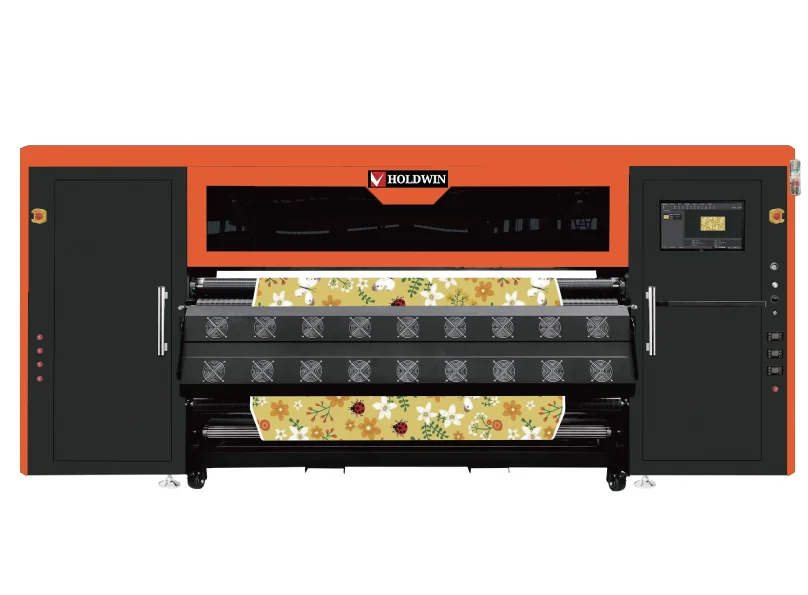
如果你想在不拘泥于技术细节的情况下改进升华工作, 霍尔德温 有很好的解决方案。 霍尔德温 支持多种打印机,包括宽幅打印机。他们的系统与用于软标志或服装的不同油墨和材料配合使用。它们非常适合在聚酯衬衫、家居装饰织物、样品、帆布袋、枕头、围巾、旗帜或纺织小工具上印刷。

如何将自定义配置文件集成到RIP软件中?
RIP(光栅图像处理器)软件将设计文件连接到打印机。它将图形转换为打印机可以使用的数据,使用ICC配置文件应用颜色修复。
要使用Holdwin的自定义配置文件:
- 将ICC文件导入RIP软件。
- 在特定打印作业的介质设置中进行设置。
- 如有需要,调整线性化曲线。
- 打印测试页以检查是否有平滑的灰色和渐变。
- 将设置保存为未来作业的预设。
这确保了无论谁运行打印机或接下来是什么设计,每个打印作业都使用相同的颜色逻辑。
| 🔍 技术见解: 了解更多关于 升华曲线和染料转移性能 以确保您的生产保持一流水平。
Holdwin配置文件如何提高复杂设计的一致性?
升华可能很棘手。保持灰色中性或肤色自然很难。 霍尔德温 针对每种材料类型,我们采用先进的仿形方法来解决这些问题。
它们的轮廓使明亮的颜色流行起来,同时保持渐变平滑。这是照片或详图的关键。它们在不同的表面上进行了测试:
聚酯纤维织物保持锋利,颜色不会过多
聚酯在升华过程中很常见,因为它与染料配合良好。但如果轮廓不正确,它可能会变得太亮。 霍尔德温的解决方案平衡了颜色。它们使细节保持清晰,如缝合或织物纹理。
陶瓷和金属面板的油墨扩散得到控制
硬表面需要与织物不同的油墨设置。霍尔德温调整轮廓,使红色保持真实,黑色保持深沉,即使在杯子或标志上传递了高热后也是如此。
哪些维护实践有助于随着时间的推移保持配置文件的准确性?
如果你不维护,即使是很好的配置文件也会失去准确性。以下是如何使事情保持正轨:
- 经常校准:每周检查线性化,以保持灰度稳定。
- 控制你的空间:保持印刷和印刷区域的温度和湿度稳定。
- 观察油墨批次:不同批次的油墨可能略有不同。如果更换供应商,请重新配置。
这些步骤可以防止小问题破坏大批量印刷。他们还可以防止几个月后重新订购的问题,让客户满意。
结论
准备好升级你的彩色游戏了吗?浏览我们的最新动态 数码印刷产品 或联系我们的团队进行定制ICC设置。