English
  Arabic
  Chinese
  French
  German
  Portuguese
  Russian
  Spanish
  Polish
  Italian
What Is CMYK?
Have you ever wondered how printers create so many colors using only four cartridges? They use the CMYK model(also known as process color, or four color): Cyan, Magenta, Yellow, and Black (known as “Key”).
This acts as a “subtractive” process. Imagine starting with a piece of white paper; as you add ink, you are “subtracting” the white space to create color.
- Why do we need the Black ink? If you mix Cyan, Magenta, and Yellow together, you don’t actually get a perfect black—you get a muddy brown.
- How it works: Printers use pure Black ink for sharpness and depth, while the other three colors mix together to create every other color you see, like combining cyan and yellow to make green.
What Does the ‘K’ in CMYK Stand For?
Black (K) is introduced to ensure deep shadows and crisp definition. It is designated as the Key color because it serves as the anchor for the image’s detail, determining the final structural outcome.
CMYK vs RGB
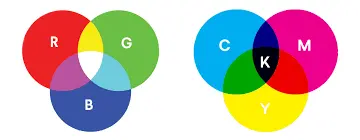
| Feature | CMYK | RGB |
| Model Type | Subtractive | Additive |
| Usage | Print Materials | Screens and Digital Content |
| Primary Colors | Cyan, magenta, Yellow, Black (Key) | Red, Green, Blue |
Graphics designed in RGB need conversion to CMYK for printing.
| Pro Tip: If your final output is print, choose CMYK as your document’s color mode at the start.
This prevents unexpected color shifts during printing and ensures accuracy in color reproduction. Always double-check with your printer’s requirements, as different printers may have specific settings or profiles for optimal results. Proofing your design on screen using CMYK soft-proofing tools can also help visualize how colors will appear in print.
Subtractive vs Additive Model
Additive Colors (RGB): This model starts with black (no light). As Red, Green, and Blue light are added, the colors become brighter, ultimately mixing to create white. The screen you are reading this on uses the additive method.
Subtractive Colors (CMYK): This model starts with white (like a blank sheet of paper). As Cyan, Magenta, and Yellow inks are added, they subtract light, making the result darker and darker until they mix to produce black.
Why is CMYK important for printing?
CMYK’s subtractive color model provides uniform results. This guarantees that prints on paper, fabric, and other materials look consistent and match the original design.