Portuguese
  English
  Arabic
  Chinese
  French
  German
  Russian
  Spanish
  Polish
  Italian
Impressão DTF (Direct-to-Film) tem impacto significativo na decoração de vestuário com suas impressões impressionantes, versatilidade e habilidade de gerenciar projetos detalhados. No entanto, o consumo de tinta e os custos totais de impressão podem aumentar rapidamente. Se você está procurando refinar seu processo de impressão e cortar custos sem sacrificar qualidade, você está no lugar certo.
Neste artigo, investigamos estratégias accionáveis para baixar Tinha DTF consumo e diminuir seu custos de impressão do DTF enquanto assegurando que seus resultados parecem afiados e profissionais.
Refine as Configurações da Impressora para a Saída Máxima
Sua impressora o software é sua defesa inicial contra custos crescentes. Ao examinar as configurações, você pode ampliar muito seu tinta dtf fornecimento.
- Saturação de tinta fina: As configurações de alta densidade geralmente levam a sobraturação e secagem lenta. - Baixar os limites de tinta em 5-10% em seu Software RIP DTF economiza volume significativo sem perda visível de qualidade. - Sempre correr “ etapa - testes para encontrar o equilíbrio perfeito entre vibração e resíduos.
- Trocar sólidos por meios: Grandes blocos de cores são pesados com tinta. Convertendo essas em metades, usando pequenos padrões de pontos, reduz drasticamente tinta consumo, ao mesmo tempo que melhora a respirabilidade da peça e proporciona um toque mais macio.
- Seleção estratégica de materiais: tinta, PET Film and Powder (Consumables)
Mudar para tinta de alta concentração: Usando Ink DTF de ultra alta concentração permite alcançar cores profundas e vívidas com uma camada muito mais fina de tinta. Porque a densidade de pigmentos é maior, você pode reduzir sua disposição de tinta no software do RIP, reduzindo diretamente seu custo por impressão.
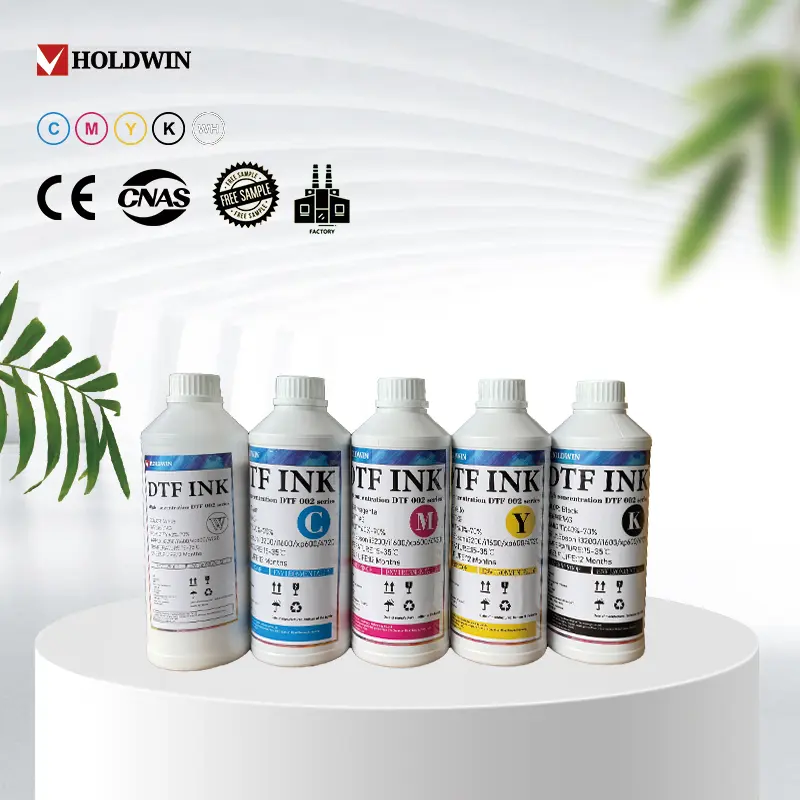
Investe em Premium DTF Film
Pode ser tentante escapar no filme, mas ‘ barato o filme pode resultar ser mais preço devido aos seus pobres tinta dtf retenção.
- Superior Coating: Alta qualidade Filmes DTF apresentam revestimentos superiores que mantêm tinta na superfície. Isso resulta em cores mais brilhantes com aplicações de tinta mais fina e menos reprintas custosas.
- Transferências de Precisião: Filmes de prémio lançam tinta mais eficazmente durante a fase de press ão de calor. Isso assegura que cada gota de tinta que você comprou transfere para a roupa, reduzindo a necessidade de reprintas custosas.
Optimizar a aplicação de pó adesiva
O pó adesivo funciona como o ‘ cola,’ Mas usar mais não é sempre vantajoso. O excesso de pó pode absorver umidade desnecessária da tinta, levando a uma textura espessa e plástica.
- The Even Spread: Usar um tremedor automatizado ou um sifter manual de malha fina garante uma camada fina e uniforme. Isto evita clumping,’ o que pode resultar em absorção desigual de tinta e impressões danificadas.
- Reclamar e reutilizar: Usar sempre uma bandeja de coleção quando aplicar pó manualmente. O excesso de pó limpo e não contaminado pode ser reciclado de volta em seus recipientes, assegurando que nenhum grão seja desperdiçado.
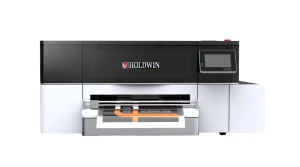
2. Upgrade to High Efficiency Hardware: The Holdwin HW30
Enquanto os ajustes de software são vitais, a eficiência de seu hardware estabelece o teto para suas poupanças. O Holdwin HW30 DTF Printer é projetada especificamente para equilibrar a produção de alta velocidade com controle de tinta de precisão. Ao contrário das conversões DIY que sofrem de ciclos freqüentes de limpeza de bloqueio de cabeça e desperdício de tinta, a HW30 apresenta um sistema de tinta estabilizado que assegura que cada gota é utilizada eficazmente. Ao investir em equipamentos de classe profissional como HW30você minimiza erros manuales e reduz resíduos materiais durante a configuração.
- Escala Inteligente: Sistemas de Bulk e Mantenimento Proativo
A eficiência não é apenas sobre suas práticas de impressão; Também se refere aos seus hábitos de compra e à proteção do seu hardware. - Comprar em recipientes maiores (1L ou 5L) facilita melhor gestão das ações. Para realmente dominar seu fluxo de trabalho, também é importante reconhecer e abordar erros comuns de impressão de DTF que geralmente levam a consumáveis desperdiçados.
- Verificação do Nozzle: Executar um padrão de teste primeiro. Identificar um único nozzle faltando cedo impede uma ruína de página inteira mais tarde.
- Capping Station Clean: Limpar secado tinta dtf construídos ao redor do selo. Uma foca pobre leva a cabeças secas durante a noite.
- Wiper Blade & Imprimircabeça: Usa suavemente uma tampa sem linha e uma solução de limpeza especializada na lâmina de limpeza e ao redor das bordas da cabeça impressa.
Ao passar 10 minutos por dia numa rotina disciplinada, você pode cortar o resíduo total de tinta em 30% a 50%.
- Verifique Sua Estratégia de Gestão de Cores
Uma das maneiras mais invisíveis de perder dinheiro Impressão DTF é através de uma baixa calibração de cores. Quando seu software não funciona, t “ falam a mesma língua. como sua impressora, muitas vezes compensa excessivamente ao jogar tinta excessiva para alcançar uma sombra específica, levando a impressões de lama e renda desperdiçada.
Criar um perfil personalizado para sua combinação específica de tinta e filme pode reduzir o consumo de tinta em 10-20%. Esses perfis dizem à impressora exatamente quanto tinta é necessária para alcançar uma cor -- não mais, não menos.
Conclusão:
Reduzir consumo de tinta e baixando os custos de impressão de DTF não é apenas sobre gastar menos, é sobre imprimir mais inteligente. Você pode reduzir os custos ao mesmo tempo que mantém impressões de alta qualidade otimizando seus projetos, ajustando as configurações da impressora, mantendo seu equipamento, e escolhendo os materiais certos.
Perguntas Frequentemente Fazidas