English
  Arabic
  Chinese
  French
  German
  Portuguese
  Russian
  Spanish
  Polish
  Italian
Affected by an incoming cold weather system, many regions are expected to experience continuous rainfall, strong winds, and a noticeable drop in temperatures. Weather forecasts indicate a sharp cooling period between the 16th and 20th, with early morning temperatures approaching 0°C and wind gusts reaching Beaufort scale levels 5–6. These cold and humid conditions present significant challenges for photo printer operation. Without proper and timely protection, equipment performance may decline, increasing the risk of malfunctions and downtime.
As a brand dedicated to stable, high-precision digital printing, HOLDWIN reminds users to take early preventive measures to keep their equipment running smoothly throughout the cold season.
-
Main effects of low temperature on photo printers
Slower drying speed : Low temperature significantly reduces the ink evaporation rate, causing the printed image to remain wet for a long time. This not only affects subsequent processes such as lamination and cutting, but may also cause the image to stick or be damaged.
Increased risk of printhead clogging : Ink viscosity increases and fluidity decreases at low temperatures, making it more prone to accumulating and solidifying at the nozzles, causing printhead clogging, affecting print quality, and even requiring professional cleaning or replacement of the printhead.
Degraded image quality : Low temperatures are often accompanied by low humidity, which can easily lead to media shrinkage and uneven ink adsorption, resulting in color distortion, horizontal lines, ink bleeding, and other phenomena, directly affecting the finished product and customer satisfaction.
2. Key Maintenance Measures: Environmental Control First
For optimal performance, HOLDWIN photo printers are recommended to operate in environments with:
Temperature: 15°C – 30°C
Humidity: 35% – 65%
To ensure stable operation during winter:
- Turn on the air conditioner or heater in time to maintain a stable indoor temperature, and you can also use a humidifier to adjust the air humidity.
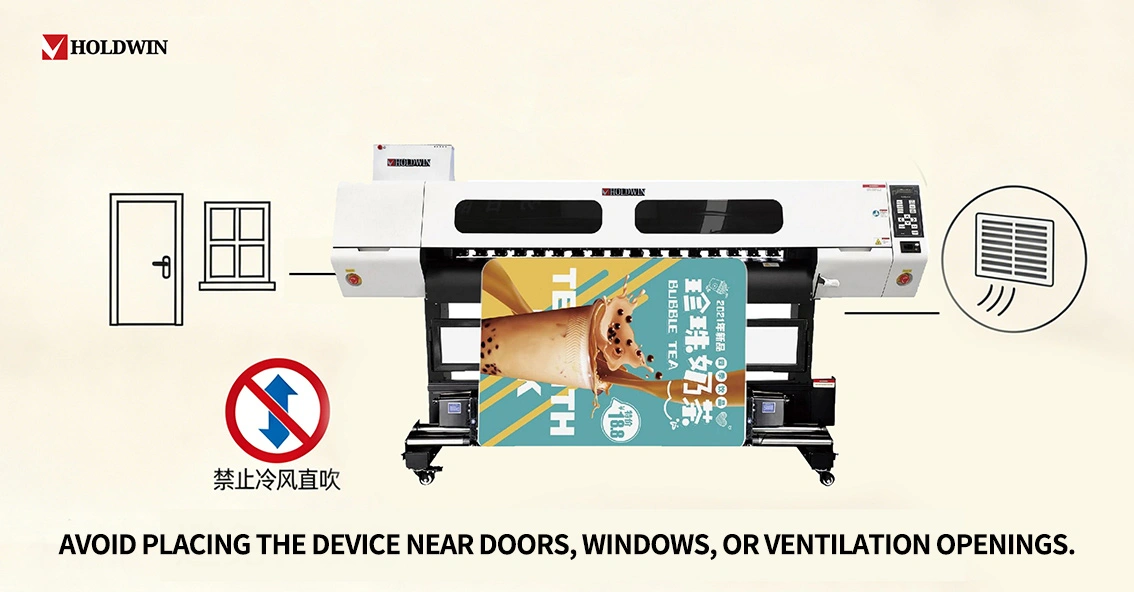
- Avoid placing the equipment near doors, windows, or vents to prevent cold air from blowing directly on it;
- If the environment is difficult to control, consider setting up a temporary insulated space around the equipment and monitoring the temperature and humidity data daily.
3. Daily Operation and Maintenance
Warm-up : After powering on each day, perform a self-check and printhead cleaning to ensure smooth ink flow. You can print a test page before printing to check the printhead status.
Ink and Media Management : In cold weather, it is recommended to use winter-specific inks and store them in an environment above 10°C; printing media should also be kept dry to avoid moisture and deformation.
Shutdown precautions : After the end of each workday, perform the normal shutdown procedure, and cover the dust cover after the printheads have returned to their positions. If the equipment is not used for an extended period, the ink path should be cleaned and the ink stored according to specifications.
Regular inspection : Check the ink tubes, circuits, guide rails and other components for abnormalities every week, clean the platform dust in time, and clean the grating strips to ensure accurate equipment positioning.
4. Personnel Operation and Emergency Response Plan
- Operators should take care to keep warm to avoid operational errors caused by cold;
- Establish contingency plans for printing in low-temperature weather, such as printing in batches and extending the drying time of the prints;
- If the nozzles are severely clogged or the equipment malfunctions, stop the machine and contact a professional for assistance. Do not disassemble the equipment yourself.
5. Long-term storage recommendations
If the Holdwin printer needs to be shut down for an extended period during the cold season:
- Thoroughly clean the printhead and ink path to prevent residual ink from solidifying;
- Move the equipment to an indoor environment with stable temperature and humidity, and cover it with the original factory cover.
- Before reactivating the device, allow it to stand in a suitable environment for several hours and perform a comprehensive test.
Stay Productive, Even in Cold Weather
HOLDWIN photo printers are designed to support reliable production year-round. Take preventive measures early, maintain consistent performance, and let your equipment withstand the cold—so your business can continue to grow without interruption.